Create a cute, high-quality Malayalam WhatsApp sticker pack using my uploaded photo.

Make 12 separate stickers with natural, funny and expressive reactions.
Use Tamil only for all sticker text, no English.

Texts:
என்ன பாஸ் இது!
சும்மா இருங்க
அட போங்கப்பா
நான் பார்த்துக்கிறேன்
அது வேற லெவல்
என்னடா நடக்குது?
சரி விடுங்க
நல்லா சொன்னீங்க
இது கொஞ்சம் ஓவரு
நான் வர்றேன்
அப்புறம் பேசலாம்!
சந்தோஷமா இருங்க

Give each dialogue a matching facial expression and pose.
Use a clean white sticker outline and transparent background.
Keep my face recognizable and consistent.

Make it as a proper sticker pack for WhatsApp, not a normal poster or collage
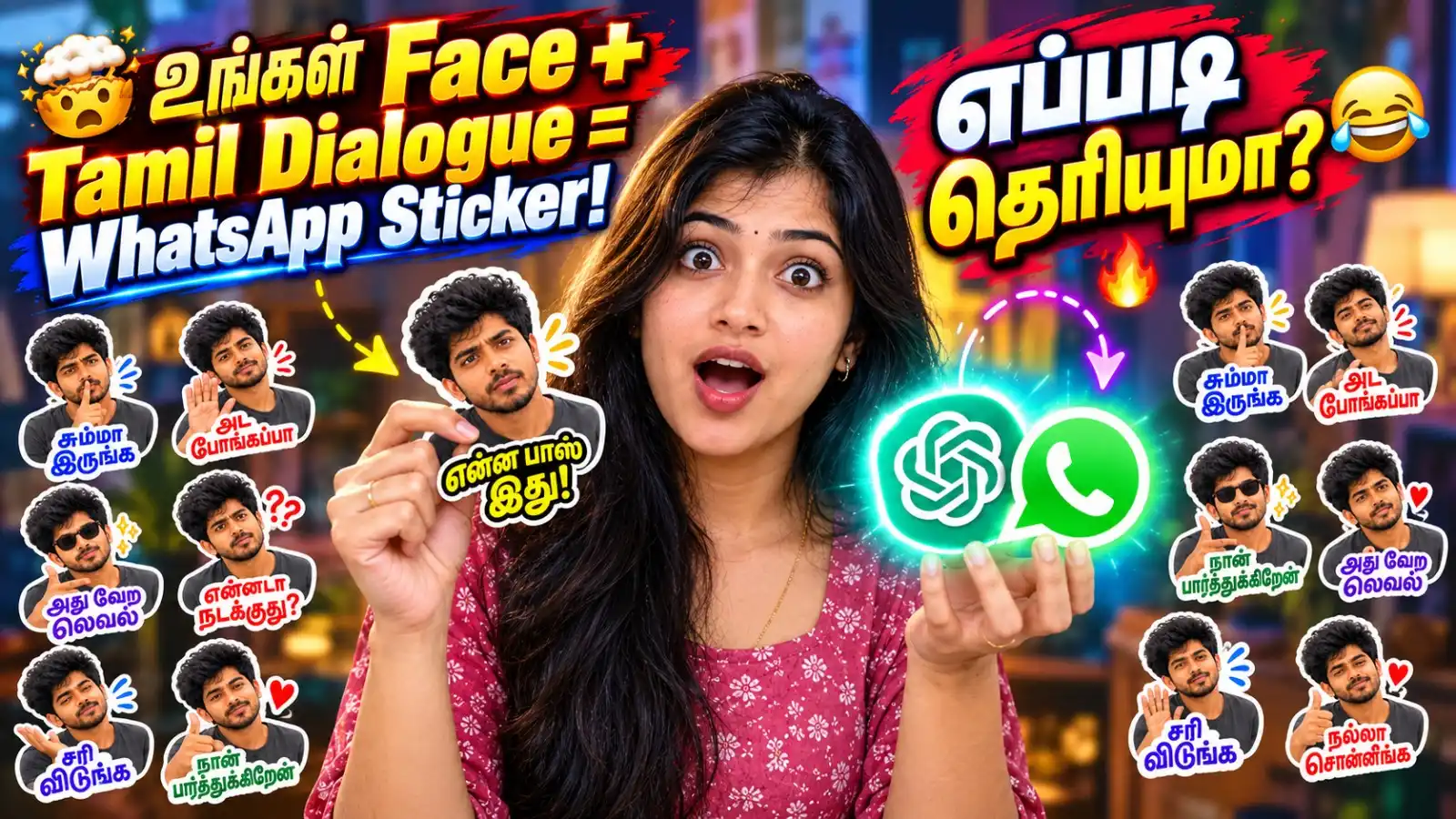
WhatsApp stickers make daily conversations more fun. People usually download ready-made sticker packs, but AI tools now allow you to create personalised stickers using your own photo. Your face can be turned into funny, cute and expressive reactions with popular Tamil dialogues.
You do not need professional editing knowledge to try this method. Upload one clear portrait photo to a supported AI image generator and enter the prompt provided below. The AI can create different reactions such as surprise, happiness, confusion, confidence and playful anger while keeping your face recognisable.
This prompt requests 12 Tamil reaction stickers. Every dialogue is matched with a suitable facial expression and pose. It also asks for a transparent background and a clean white outline, which are important for creating a proper sticker-style appearance.
However, an AI-generated image does not always become an installable WhatsApp sticker pack automatically. You may need to download each reaction separately and import it using WhatsApp’s sticker creation feature or a trusted sticker-making app.
This guide explains the complete process, including the AI prompt, recommended photo quality, Tamil text correction, privacy checks and the steps required to add the final designs to WhatsApp.
AI Prompt for Tamil WhatsApp Stickers
Upload your portrait photo before entering this prompt. Copy the complete prompt without removing the identity, text or background instructions.
Use my uploaded portrait photo as the only identity reference.

Create a cute, high-quality Tamil WhatsApp sticker pack featuring the same person from my uploaded photo.

Create 12 individual reaction stickers. Every sticker must be a separate and complete design. Do not create a poster, advertisement, thumbnail, grid or combined sticker collage.

Keep the person’s face recognisable and consistent across all 12 stickers. Preserve the original face shape, skin tone, hairstyle and important facial features. Do not replace the person with another model.

Use only Tamil for all sticker dialogues. Do not include English, Malayalam, Hindi or any additional words.

Create these 12 stickers:

1. “என்ன பாஸ் இது!” – Show a surprised and confused expression with both hands slightly raised.

2. “சும்மா இருங்க” – Show a calm but slightly annoyed expression with one hand making a stop gesture.

3. “அட போங்கப்பா” – Show playful irritation while turning the face slightly away and waving one hand.

4. “நான் பார்த்துக்கிறேன்” – Show a confident expression while pointing towards the person’s chest.

5. “அது வேற லெவல்” – Show an amazed and impressed expression with a thumbs-up pose.

6. “என்னடா நடக்குது?” – Show a shocked and confused expression with wide eyes while looking around.

7. “சரி விடுங்க” – Show a relaxed expression with a dismissive hand gesture.

8. “நல்லா சொன்னீங்க” – Show a happy and approving expression with a clapping or thumbs-up pose.

9. “இது கொஞ்சம் ஓவரு” – Show a doubtful and mildly irritated expression with one eyebrow raised.

10. “நான் வர்றேன்” – Show an energetic and happy expression while moving or pointing forward.

11. “அப்புறம் பேசலாம்!” – Show a slightly busy expression with a phone-call hand gesture.

12. “சந்தோஷமா இருங்க” – Show a warm smile with a positive blessing or heart-hand gesture.

Sticker design requirements:

- Use a cute, high-quality, semi-realistic caricature style.
- Keep the face natural, recognisable and consistent.
- Use natural, funny and expressive reactions.
- Maintain the same clothing and visual style across all stickers.
- Show the upper body, face and hand gestures clearly.
- Display every Tamil dialogue exactly as provided.
- Use large, bold and highly readable Tamil typography.
- Use bright text colours with a dark border or shadow.
- Add a thick, smooth, clean white die-cut outline around the person and text.
- Use a fully transparent background.
- Do not add a white square or rectangular background.
- Do not crop the head, hands, dialogue or sticker outline.
- Do not add a logo, watermark, signature, extra person or decorative scene.
- Maintain enough empty space around each design for clean separation.
- Make them look like proper messaging stickers, not normal photographs.
- Do not combine all the stickers into a single poster or promotional design.

Generate each of the 12 stickers as an individual square image in high resolution.
Why “Tamil Sticker Pack” Is Important in This Prompt
The original version of this prompt mentioned a “Malayalam WhatsApp sticker pack,” even though all 12 dialogues were in Tamil. That can confuse the AI and may cause Malayalam letters or mixed-language text to appear in the result.
Therefore, the corrected prompt clearly requests a Tamil WhatsApp sticker pack and prohibits English, Malayalam and Hindi text.
What Type of Photo Should You Upload?
The quality of the reference photo can directly affect the final stickers. Choose an image in which your face is clearly visible.
For better results:
- Use a sharp and properly focused portrait.
- Make sure the face is not covered by hair, hands or other objects.
- Choose a photo with natural lighting.
- Avoid photos with heavy shadows over the face.
- Do not upload a crowded group photo.
- Avoid very small, distant or heavily compressed images.
- A front-facing or slightly angled face works well.
- Head-to-waist framing is enough for most reaction stickers.
A full-body photo is not compulsory. A clear portrait that includes the face, shoulders and upper body usually provides enough information.
What If the AI Writes Incorrect Tamil Text?
AI image generators may not always reproduce Tamil words correctly. Missing letters, changed words and meaningless characters can sometimes appear even when the correct dialogue is included in the prompt.
If this happens, generate the reaction stickers without any text. You can then add the correct Tamil dialogues manually using Canva or another image editor.
Use the following alternative prompt:
Use my uploaded portrait photo as the only identity reference.

Create 12 separate cute, funny and expressive WhatsApp reaction stickers using the same person.

Keep the face shape, skin tone, hairstyle and identity recognisable and consistent across every sticker.

Create these 12 reactions:

1. Surprised and confused.
2. Calm stop-hand reaction.
3. Playfully irritated.
4. Confidently pointing towards self.
5. Highly impressed with a thumbs-up.
6. Shocked and confused with wide eyes.
7. Relaxed dismissive hand gesture.
8. Happy approval and clapping.
9. Doubtful expression with one eyebrow raised.
10. Energetically coming forward.
11. Busy phone-call hand gesture.
12. Warm, happy smile with a positive heart gesture.

Use a cute, high-quality, semi-realistic caricature style.

Use a fully transparent background and add a thick, smooth white die-cut sticker outline around the person.

Leave a clean empty space near the bottom of each sticker for adding Tamil dialogue later.

Do not generate any letters, words, captions, logos, watermarks, signatures, backgrounds or extra people.

Generate each reaction as a separate square image.
Add these dialogues manually after generating the images:
- என்ன பாஸ் இது!
- சும்மா இருங்க
- அட போங்கப்பா
- நான் பார்த்துக்கிறேன்
- அது வேற லெவல்
- என்னடா நடக்குது?
- சரி விடுங்க
- நல்லா சொன்னீங்க
- இது கொஞ்சம் ஓவரு
- நான் வர்றேன்
- அப்புறம் பேசலாம்!
- சந்தோஷமா இருங்க
How to Make Tamil WhatsApp Stickers from Your Photo
Step 1: Select a Clear Photo
Choose a portrait in which your face, hairstyle and important facial features are clearly visible. Avoid using a blurred screenshot or a heavily edited beauty photo.
Step 2: Upload the Image
Open an AI image generator that supports reference-image uploads. Upload your selected photo and wait until the upload is complete.
Step 3: Enter the Prompt
Copy and paste the complete prompt provided above. Do not remove the instructions about separate images, transparent backgrounds or exact Tamil spelling.
Step 4: Check the Person’s Face
Make sure the generated person still looks like the person in the uploaded photo. Check the face shape, eyes, hairstyle and skin tone across all reactions.
Step 5: Verify Every Tamil Dialogue
Read every word carefully. A sticker may look attractive but still contain a spelling mistake. Regenerate that particular design or add the text manually when an error appears.
Step 6: Separate the Stickers
Each reaction should be saved as a separate image. If the AI produces one combined sheet, crop every sticker carefully without cutting the outline, hand gesture or dialogue.
Step 7: Remove the Background
Confirm that the image has a genuinely transparent background. A white square background may remain visible when the sticker is used in WhatsApp Dark Mode.
Step 8: Import the Designs
Use WhatsApp’s available custom-sticker option or a trusted sticker-making application to import the images. Arrange them as one pack and add a suitable pack name.
Step 9: Test Before Sharing
Send each sticker to your own chat first. Check its size, text readability, outline and appearance in both Light Mode and Dark Mode.
WhatsApp provides information about creating and sharing custom stickers through its official Help Center. WhatsApp also maintains an official sticker repository for developers building third-party sticker pack apps.
How to Improve Sticker Quality
A good WhatsApp sticker must remain clear on a small mobile screen. Avoid adding long sentences, complicated backgrounds and very small fonts.
Use bold Tamil letters with enough spacing. A dark shadow or outer stroke can prevent light-coloured text from disappearing over the person’s clothes.
The facial reaction should also match the dialogue. For example, “என்னடா நடக்குது?” needs a confused or shocked face. A normal smiling expression would weaken the meaning of the sticker.
The white sticker outline should surround both the person and dialogue. This gives the design a clean, cut-out appearance and keeps it visible against different chat wallpapers.
Can All 12 Stickers Be Generated at Once?
The prompt requests 12 individual images. However, some AI tools may produce a single sheet or collage containing all the reactions.
If this happens, you can:
- Ask the AI to regenerate each sticker separately.
- Generate one dialogue at a time.
- Crop the sheet into 12 separate files.
- Check the resolution after cropping.
- Add the Tamil text manually for better accuracy.
Generating one sticker at a time usually provides better facial consistency, clearer hand gestures and more readable text. It may take longer, but the final quality can be noticeably better.
Privacy and Safety Checks
Your face is personal information. Check the privacy terms of the AI service before uploading a photograph.
Follow these basic precautions:
- Upload only your own photo or an image you have permission to use.
- Do not create stickers from another person’s photo without consent.
- Avoid uploading images that show an address, identity card or phone number.
- Be careful when uploading children’s photos.
- Do not use stickers to impersonate, insult or harass another person.
- Check every generated image before sharing it publicly.
- Remove unwanted AI-generated words, signs or symbols.
WhatsApp states that sticker content must be legal, authorised and acceptable under its service rules.
Frequently Asked Questions
Can I create WhatsApp stickers using my own face?
Yes. A clear portrait photo can be used as an identity reference to generate personalised reaction stickers.
Can this prompt be used for both men and women?
Yes. The prompt follows the person shown in the uploaded reference photo. It does not require a specific gender.
Why does the AI change my face?
AI may reinterpret facial details while creating new expressions. Using a sharp front-facing photo and asking it to preserve identity can reduce major changes, but every result should still be checked.
Why are the Tamil words incorrect?
Many image generators are better at creating visuals than producing exact Tamil typography. Generate the design without text and add the correct dialogue manually if spelling errors continue.
Is a transparent background necessary?
A transparent background makes the image look like a proper sticker. A visible square background can make it look like an ordinary picture.
Can I upload the generated image directly to WhatsApp?
It depends on how the image was generated and which WhatsApp feature is available on your device. You may need to separate the designs and import them using WhatsApp’s sticker option or a trusted sticker maker.
Is this an official WhatsApp sticker pack?
No. It is a custom sticker pack created by the user. It is not produced, approved or sponsored by WhatsApp.
Can I share the sticker pack with friends?
Yes, provided you own the photo and the generated content does not violate anyone’s privacy, rights or applicable platform rules.
Final Words
This AI prompt provides a simple way to turn one portrait photo into 12 expressive Tamil WhatsApp stickers. The dialogues cover common reactions, including surprise, appreciation, confusion, confidence and happiness.
For the best result, use a clear photo, check every Tamil word and save each reaction as a separate transparent image. If the AI struggles with Tamil lettering, create the visual stickers first and add the dialogues manually. This small extra step can provide a cleaner and more professional sticker pack.
More Posts You May Like