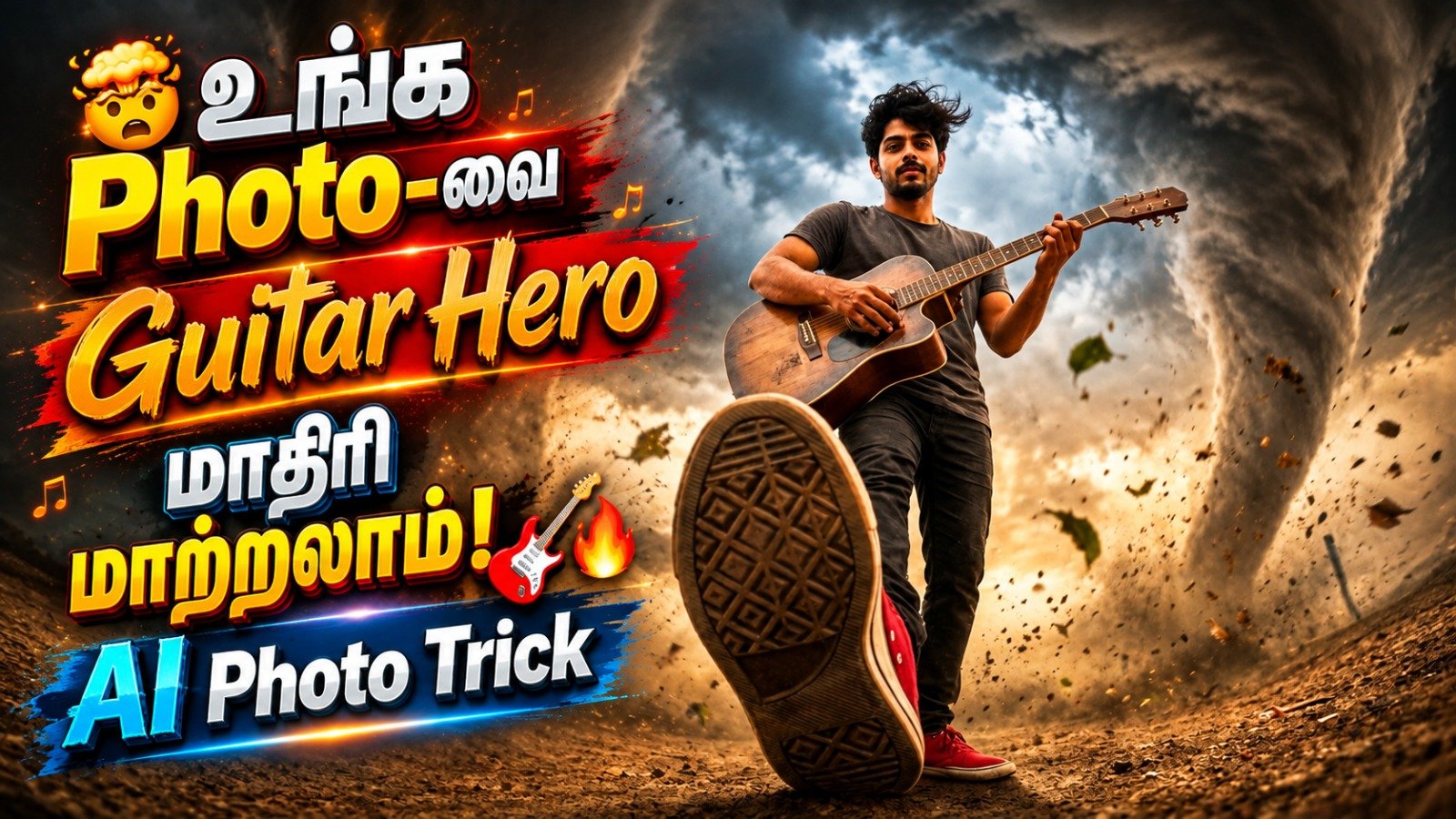
AI image generators can turn a simple idea into a powerful cinematic scene. If you want to create a dramatic photo of a man standing calmly inside a massive tornado, this AI photo prompt is worth trying.
The special part of this prompt is the worm’s-eye camera angle. The camera appears to be placed very close to the ground, while a red sneaker dominates the foreground. Behind it, a rugged man stands in the center of a huge swirling tornado while holding an acoustic guitar.
The result can look like a frame captured from an epic disaster movie.
Quick Overview
Prompt Type: Cinematic AI Photo Prompt
Scene: Man standing inside a tornado
Camera Angle: Dramatic worm’s-eye view
Special Effect: Extreme forced perspective
Main Prop: Acoustic guitar
Foreground Detail: Red sneaker sole
Image Style: Hyper-realistic and cinematic
Recommended Ratio: 9:16 Vertical
Best For: AI photos, wallpapers, posters, Reels and status images
Copy This AI Tornado Man Photo Prompt
Copy the following prompt and use it in a compatible AI image generator:
A SURREAL, CINEMATIC SHOT FROM A DRAMATIC WORM'S-EYE VIEW, LOOKING UP FROM THE GROUND. A RUGGED MAN WITH A BEARD MAKES INTENSE, DIRECT EYE CONTACT WITH THE CAMERA AS HE STANDS CALMLY IN THE ABSOLUTE CENTER OF A MASSIVE, POWERFUL TORNADO. THE TORNADO FUNNEL SWIRLS SYMMETRICALLY AROUND HIM, KICKING UP DUST AND LEAVES. HIS FLANNEL SHIRT AND HAIR ARE WHIPPED BY THE WIND. THE TEXTURED SOLE OF HIS BOLD RED SNEAKER IS PLANTED FIRMLY ON THE GROUND, DOMINATING THE FOREGROUND AND CREATING AN EXTREME FORCED PERSPECTIVE. HE HOLDS A WEATHERED ACOUSTIC GUITAR. HYPER-REALISTIC DETAIL, EPIC ATMOSPHERE, DRAMATIC LIGHTING. --AR 9:16 --STYLE RAW --V 6.0
What Does This AI Prompt Create?
This prompt is designed to create an unusual cinematic composition rather than a normal portrait.
The AI camera is positioned extremely low to the ground. One red sneaker is placed very close to the virtual camera, making the shoe appear unusually large.
The man’s body becomes progressively smaller toward the background because of the forced perspective.
Behind him, a massive tornado surrounds the character. Dust, leaves, clothing and hair reacting to the wind help make the scene feel more dynamic.
At the same time, the man remains calm and makes direct eye contact with the camera.
This contrast between the violent storm and the calm character is what gives the image its cinematic impact.
Why Does the Worm’s-Eye View Look So Powerful?
A worm’s-eye view means the camera looks upward from a very low position.
It can make a person appear larger, stronger and more dominant.
In this prompt, the technique is pushed further by placing the sneaker extremely close to the camera.
This creates an extreme forced-perspective effect.
Instead of getting an ordinary full-body portrait, you may get a much more dramatic composition with three clear visual layers:
Foreground: Large textured red sneaker sole
Middle: Man holding an acoustic guitar
Background: Huge rotating tornado, dust and flying leaves
This depth is one of the most important parts of the prompt.
Why Is the Tornado Important?
The tornado is not simply a background element.
The prompt asks the AI to position the man in the absolute center of a massive tornado.
This can create a visually balanced funnel surrounding the subject.
The flying dust and leaves also add movement to the scene, while the man’s flannel shirt and hair reacting to the wind make the environment feel more believable.
The final image combines chaos and calmness in the same frame.
How to Use This AI Photo Prompt
Copy the prompt above and paste it into an AI image generator that supports detailed text-to-image instructions.
Generate the image and check these important details:
- The man should remain near the center of the tornado.
- The camera should appear very close to ground level.
- The sneaker should dominate the lower foreground.
- The tornado should surround the subject instead of appearing far behind him.
- The guitar should look natural in his hand.
- Clothing, hair, leaves and dust should show strong wind movement.
- The face and shoe should contain realistic details.
If the first generation does not produce the expected perspective, generate another version or strengthen the camera instructions.
Improved Universal Version of the Prompt
Some AI image generators may not understand platform-specific parameters. In that case, try this cleaner universal version:
A hyper-realistic cinematic photograph shot from an extreme worm's-eye perspective, with the camera almost touching the ground and looking upward. A rugged bearded man stands calmly in the exact center of a gigantic powerful tornado, making intense direct eye contact with the camera. One bold red sneaker is planted extremely close to the lens, its highly detailed textured sole dominating the foreground and creating dramatic forced perspective. The enormous tornado funnel swirls symmetrically around the man, throwing dust, dry leaves and debris through the air. Strong winds whip his hair and flannel shirt. He holds a weathered acoustic guitar naturally in one hand. Epic storm atmosphere, realistic wind interaction, volumetric storm clouds, dramatic cinematic lighting, realistic skin texture, sharp facial detail, realistic fabric, highly detailed shoe sole, deep environmental perspective, photorealistic DSLR quality, vertical 9:16 composition.
Make the Tornado Look More Realistic
If your generated tornado looks artificial, add more environmental details.
For example, you can include:
“realistic volumetric clouds, airborne dust particles, flying leaves, atmospheric depth, turbulent wind, natural debris motion and cinematic storm lighting.”
Small environmental details can make a major difference in photorealistic AI images.
Change the Red Sneaker
The red sneaker is one of the strongest visual elements in this composition.
You can easily change it.
For example:
White sneaker:
bright white modern sneaker with a highly detailed textured sole
Black boot:
rugged black leather boot planted firmly near the camera
Brown outdoor boot:
weathered brown hiking boot with mud and realistic sole texture
Changing the footwear can completely change the mood of the image.
Create a Female Version
Replace the character description with:
A confident young woman stands calmly in the exact center of a massive tornado, making intense direct eye contact with the camera. Her hair and clothing are dramatically swept by the powerful wind.
You can then customize the clothing, footwear and props according to the type of image you want.
Create a Tamil Hero-Style Version
For a more South Indian cinematic appearance, try changing the character description to:
A rugged South Indian man with a beard and intense eyes stands fearlessly in the center of a gigantic tornado, wearing a wind-blown casual shirt, dark trousers and bold red sneakers.
You can also replace the guitar with another suitable object or remove it completely.
Remove the Guitar
The acoustic guitar gives the original scene a unique personality, but it is optional.
For a pure action-style image, replace:
He holds a weathered acoustic guitar.
with:
His arms remain naturally relaxed while he stands fearlessly against the violent storm.
This makes the tornado and character the main focus.
Turn It Into a Movie Poster
You can also adapt the same concept for a cinematic poster.
Add instructions such as:
cinematic movie poster composition, large negative space for title, dramatic storm atmosphere, theatrical lighting, premium film-poster photography
If you plan to add text later, asking the AI to leave some clean negative space can make editing easier.
Tips for Better AI Image Results
The most important feature of this prompt is not simply the tornado. It is the combination of camera angle, foreground scale and centered character placement.
If your result looks like a normal standing portrait, emphasize phrases such as:
“camera almost touching the ground”
“shoe extremely close to the lens”
“sole fills a large portion of the lower foreground”
“extreme forced perspective”
If the tornado appears only in the background, emphasize:
“the character stands inside the tornado funnel”
and
“the tornado symmetrically surrounds the character.”
These instructions give the AI a clearer understanding of the intended composition.
Why Use a 9:16 Aspect Ratio?
The 9:16 vertical format works particularly well for this composition because it provides enough height to show both the foreground sneaker and the towering tornado.
It is also suitable for vertical mobile content such as:
- Smartphone wallpapers
- Instagram Reels visuals
- YouTube Shorts artwork
- WhatsApp Status images
- Facebook vertical posts
- AI cinematic posters
The vertical frame can make the tornado appear taller and more imposing.
Frequently Asked Questions
What is a tornado AI photo prompt?
A tornado AI photo prompt is a text instruction used to generate an artificial image featuring a tornado or storm environment. The prompt can specify the person, camera angle, clothing, lighting and other visual details.
What is a worm’s-eye view in AI photography?
A worm’s-eye view places the virtual camera extremely low and points it upward. It can make the subject appear powerful and create dramatic foreground perspective.
Why is the sneaker so large in this prompt?
The sneaker is deliberately positioned close to the virtual camera. This creates forced perspective, where nearby objects appear much larger than objects farther from the lens.
Can I change the man in this prompt?
Yes. You can change the character’s gender, age, clothing, hairstyle, footwear and other non-identifying visual characteristics.
Can I remove the acoustic guitar?
Yes. The guitar is optional. You can remove it or replace it with another appropriate prop.
Can this prompt create a 9:16 image?
Yes. The composition is designed for a vertical 9:16 image. If your AI generator provides an aspect-ratio setting, select 9:16.
Why doesn’t my generated image look exactly like the prompt?
AI image generation can vary between models and even between repeated generations using the same prompt. Camera perspective, hands, footwear, props and complex tornado geometry may require several generations or prompt adjustments.
Final Words
This AI tornado man prompt combines a worm’s-eye camera angle, extreme forced perspective, dramatic tornado environment and hyper-realistic photography in one composition.
The oversized red sneaker in the foreground immediately attracts attention, while the centered tornado and calm character create a strong cinematic contrast.
You can use the original prompt as it is or customize the character, clothing, footwear, guitar, storm and lighting to create your own version.
SEO Title: AI Tornado Man Photo Prompt – Cinematic 9:16 Image
Meta Description: Copy this AI tornado man photo prompt to create a hyper-realistic cinematic 9:16 image with a worm’s-eye view, red sneaker and dramatic storm.
Suggested Slug: ai-tornado-man-photo-prompt
Suggested Tags: AI photo prompt, tornado AI prompt, cinematic AI prompt, AI image prompt, worm’s-eye view prompt, 9:16 AI prompt, realistic AI photo prompt, tornado man prompt, forced perspective AI prompt, cinematic photo prompt
More Posts You May Like