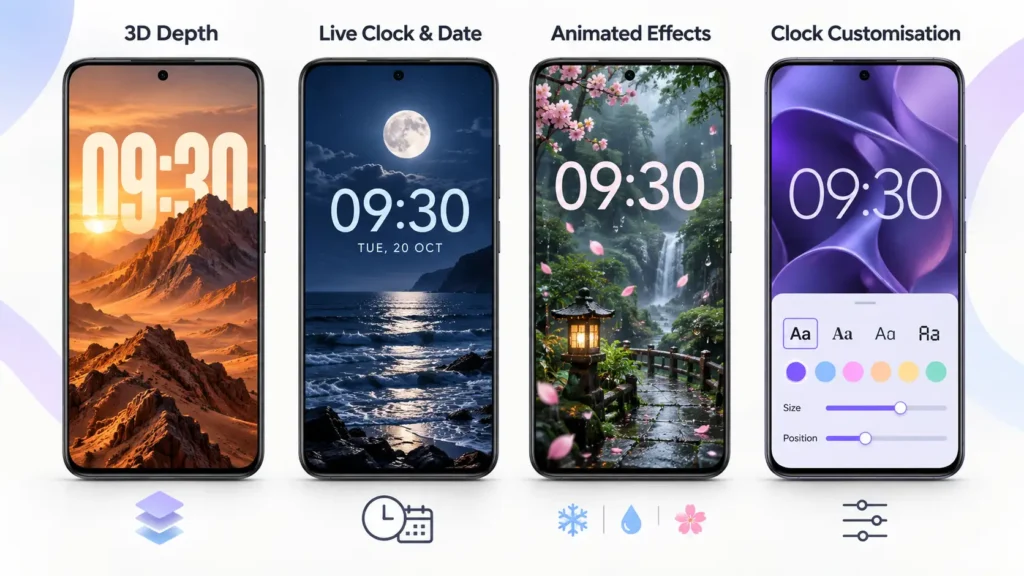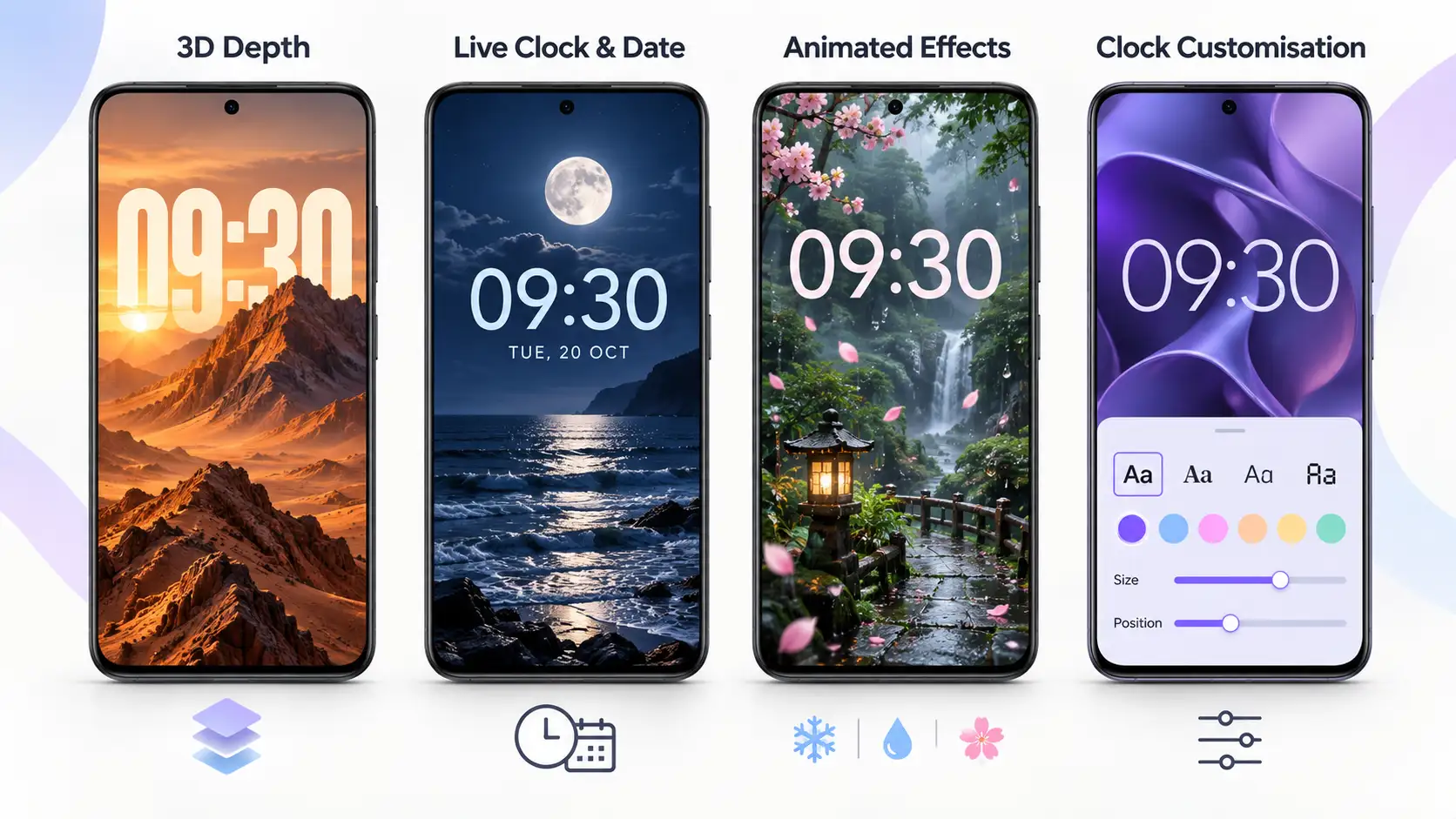
A wallpaper can change the appearance of your phone, but an integrated clock can make the entire screen feel more coordinated. DepthX – Live Clock Wallpapers combines layered backgrounds with live time and date displays, customisable typography and optional animated effects.
The app is designed for Android users who enjoy personalising their home screens. You can adjust the clock’s appearance, add your own text and explore wallpapers with depth and motion effects.
This guide explains the advertised features, how to approach setup and what to check before paying. It is based on the developer’s description and Google Play listing, rather than hands-on testing.
DepthX App Details
| Detail | Information |
|---|---|
| App name | DepthX – Live Clock Wallpapers |
| Developer | AppsLab Co. |
| Platform | Android |
| Category | Personalization |
| Google Play downloads | 1 million+ |
| Purchases | Offers in-app purchases |
| Listed update date | October 17, 2026 |
| Support email | support@appslab.co |
The listing checked on October 20, 2026, identifies the latest changes as bug fixes and performance improvements. Availability and purchase options should be checked on your own device.
What Makes a Depth Wallpaper Different?
A conventional wallpaper is a flat background image. A depth-style wallpaper uses layered composition, shadows and overlapping elements to create the impression of distance between the background, subject and clock.
For example, artwork can appear in front of part of a large clock while the surrounding scene remains behind it. The effect makes the clock feel like part of the design.
Depth and motion are separate features. A layered composition can create a sense of depth without moving. Parallax adds relative movement between elements, while animated effects add details such as falling snow or rain.
Main Features of DepthX
3D Depth Wallpapers
DepthX’s main feature is its collection of layered wallpaper designs. The developer describes these as using shadows and detailed compositions to create a three-dimensional appearance.
When choosing a design, look beyond the preview’s visual impact. Check that the main subject, clock and app icons remain easy to distinguish.
A dramatic wallpaper may suit a lightly populated home screen, while a simpler design can work better behind several rows of apps.
Integrated Live Clock and Date
DepthX includes clock and date elements designed to blend with its wallpapers.
This can help create a coordinated home screen without having to visually match a separate clock widget to the background. However, a wallpaper clock should not be confused with an alarm app, an always-on display or a replacement for Android’s system clock.
If you already use a large clock widget, check whether having both clocks makes your screen feel crowded.
Clock Font, Colour, Size and Position
The advertised clock controls let you change:
- Font style.
- Text colour.
- Clock size.
- Clock position.
Start with readability. Choose a colour that contrasts with the area behind the clock, then adjust its size and position around the artwork.
For example, a narrow font can leave more room for a large subject, while a bolder style may remain easier to read against a detailed background.
Parallax Effects
DepthX advertises parallax motion for the wallpaper, clock and date. This creates a layered moving appearance rather than a completely static scene.
Try the effect in the preview before keeping it enabled. Subtle motion may look attractive without distracting from your apps, while stronger movement may not suit everyone.
The description does not establish that every wallpaper supports identical motion controls.
Rain, Snow and Sakura Effects
The listed animated effects include rain, snow and sakura petals.
These effects can complement the wallpaper’s setting, but adding more animation does not automatically improve the result. Start with one effect and check whether the clock remains clear.
A simple background with restrained animation may be more comfortable for daily use than several moving elements competing for attention.
Wallpaper Collections and Categories
The developer advertises more than 200 wallpapers across over 15 categories, along with new designs added daily.
These figures describe the advertised collection, not a guarantee that every item is included in free access. Browse the available selection and check any purchase labels before choosing a plan.
Custom Names, Quotes and Messages
DepthX also advertises custom text, allowing users to add a name, short quote or personal message.
Keep the text short enough to read at a glance. Position it away from the clock, dock and frequently used app icons.
Remember that text placed on your screen may be visible to people nearby. Avoid including information you would not want others to see.
Custom Wallpaper Design Requests
The description offers personal wallpapers created by the developer’s designers.
This is different from promising an automatic tool that converts any uploaded photo into a depth wallpaper. Before requesting a design, confirm the price, delivery time, image requirements and revision options with support.
Priority support is also advertised, but the description does not specify a guaranteed response time.
How to Set Up DepthX
The following steps are a general guide based on the advertised workflow. Exact controls can vary by app version and Android device.
- Open the official DepthX Google Play listing.
- Confirm that the developer is AppsLab Co.
- Install and open the app.
- Browse the available wallpapers and select a design.
- Adjust the clock’s font, colour, size and placement where available.
- Add custom text or animated effects if you want them.
- Review any premium-access requirement.
- Use the apply option and complete the Android wallpaper confirmation.
- Return to your home screen and check the finished layout.
Before applying, take a screenshot of your existing home screen if you want a reference for your current arrangement.
View DepthX – Live Clock Wallpapers on Google Play
Can DepthX Be Used on the Lock Screen?
The supplied description focuses on modern home screens. It does not establish universal lock-screen support.
When applying a wallpaper, check which destinations your phone offers. Do not assume that a live wallpaper can be applied independently to the lock screen on every Android device.
If lock-screen use is your main reason for installing DepthX, confirm it on your phone before purchasing. Also check whether your phone’s existing lock-screen clock overlaps with the wallpaper’s integrated clock.
Is DepthX Free?
Google Play lists DepthX as offering in-app purchases. The public information reviewed does not clearly establish the complete free-versus-paid feature breakdown or a universal price.
Before paying, check:
- Which wallpapers and editing tools the purchase unlocks.
- Whether payment is one-time or recurring.
- Whether custom design requests cost extra.
- Whether the wallpaper works as expected on your phone.
- Any renewal or trial conditions shown at checkout.
An install option does not mean every wallpaper, effect or service is free.
Battery Life and Everyday Performance
This guide has not measured DepthX’s battery use, animation smoothness or clock accuracy.
To assess it on your phone, start with a simple design and add effects gradually. Compare battery use during normal days with similar screen time, rather than judging immediately after a long customisation session.
If you notice unwanted battery use or distracting motion, reduce the available effects or return to a static wallpaper.
For the live clock, check that the displayed time stays correct after the phone has been idle and after restarting it.
Privacy and Permissions
The Google Play Data safety section declares no data collection or third-party sharing. These are developer-provided declarations, rather than an independent privacy audit.
Read any permission request in context before accepting it. If you contact support or request a custom wallpaper, share only the information and images needed for that request.
Frequently Asked Questions
Does DepthX include a live clock and date?
Yes. Integrated clock and date displays are central advertised features.
Can I change the clock’s appearance?
The description lists controls for font, colour, size and position. Check the installed version for the options available with your selected wallpaper and access level.
Can I add my name to a wallpaper?
DepthX advertises custom text for names, quotes and messages.
Does every wallpaper move?
The app advertises both depth designs and motion features. Depth is a visual layering effect; it does not necessarily mean every design continuously animates.
Can I turn my own photo into a depth wallpaper?
Automatic personal-photo conversion is not confirmed by the supplied description. It advertises a custom wallpaper service provided by designers, which may have separate requirements.
Does DepthX replace my launcher?
DepthX is presented as a wallpaper personalisation app. Its listed features do not describe a replacement launcher with an app drawer or a new app-navigation system.
Does it work on every Android phone?
Check Google Play compatibility on your device. Wallpaper destinations, performance and available controls may differ between phones.
Where can I get help?
The listed support address is support@appslab.co. For troubleshooting, include your phone model, Android version and a short explanation of the issue.
Who Is DepthX Best Suited For?
DepthX may suit users who want a coordinated wallpaper-and-clock design and enjoy experimenting with layered artwork, typography and motion.
Choose a design you can read comfortably, test it around your existing icons and confirm the paid features before purchasing. The most useful setup is one that looks attractive while keeping the time and everyday apps easy to see.