Creating realistic AI portraits has become easier than ever, but one challenge still remains: keeping the original person’s face unchanged. Many AI image generators slightly modify facial features, expressions, or hairstyles, even when using a reference image. If your goal is to create a creative clone effect while preserving the person’s identity, using a well-written prompt can make a big difference.
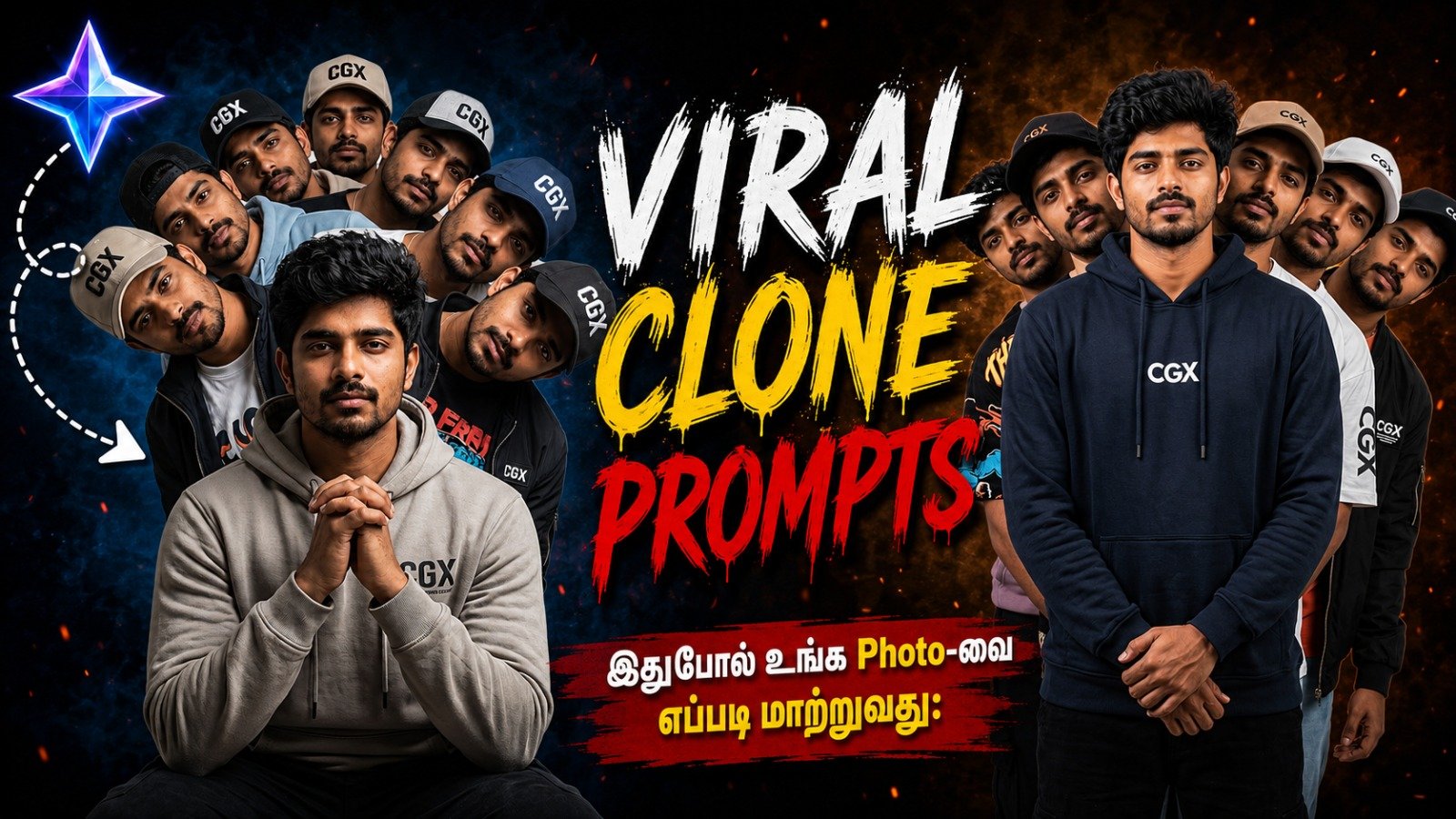
In this article, we’ll share a free AI prompt that helps generate a photorealistic central man surrounded by six identical clones, while instructing the AI to keep the model’s face as close to the reference image as possible. The result is a clean, cinematic studio portrait with a surreal clone effect that looks professional and eye-catching.
Whether you’re creating social media content, YouTube thumbnails, digital posters, profile images, or experimenting with AI photography, this prompt provides a great starting point.
Free AI Prompt
Photorealistic central man (exact match to reference: masculine facial features, hair, expression, skin tone, body) front-facing camera in stoic clasped-hands pose, surrounded by six identical male clones in single-file line behind, clones leaning heads out symmetrically left/right in cascading fan pattern for all seven faces fully visible, everyone in varied random men's streetwear (hoodies, graphic tees, baggy pants, sneakers, jackets, caps in mixed colors/styles and all dress Center text CGX), soft professional studio lighting, plain light grey seamless background, high-contrast symmetrical composition, surreal multiplicity effect, ultra-sharp 8k fabric/texture details, cinematic fashion editorial vibe --ar 3:2 --stylize 300" Don't change model face
Simply copy the prompt above and use it with your preferred AI image generator that supports reference images.
What Does This Prompt Create?
This prompt is designed to produce a highly detailed studio portrait featuring:
- One photorealistic central male subject.
- Six identical male clones positioned behind him.
- All seven faces clearly visible.
- A perfectly balanced, symmetrical composition.
- Soft studio lighting.
- A plain light grey seamless background.
- Different modern streetwear outfits for each clone.
- Ultra-sharp 8K-quality textures.
- A cinematic editorial photography style.
The overall effect resembles a high-end fashion magazine cover with a surreal twist.
Main Features of This AI Prompt
1. Identity Preservation
One of the most important parts of this prompt is the instruction:
Exact match to reference
This tells the AI to keep the same:
- Face shape
- Hair style
- Facial expression
- Skin tone
- Body structure
The additional instruction:
Don’t change model face
reinforces that the facial identity should remain consistent throughout the generated image.
2. Clone Arrangement
Instead of placing random duplicates around the image, the prompt creates a structured composition.
It includes:
- One person standing in the center.
- Six identical clones behind him.
- Heads leaning alternately left and right.
- A cascading fan pattern.
- Every face remaining visible.
This arrangement creates depth while maintaining visual balance.
3. Modern Streetwear Fashion
Each clone wears a different casual outfit, including combinations of:
- Hoodies
- Graphic T-shirts
- Sneakers
- Jackets
- Baggy pants
- Baseball caps
The clothing varies while the face stays identical, making the image more dynamic and realistic.
4. Professional Studio Photography
The prompt requests:
- Soft professional lighting.
- Plain seamless grey background.
- High contrast.
- Fashion editorial composition.
These details help the AI produce an image that resembles a professional studio photoshoot instead of a casual snapshot.
5. Ultra-High Detail
The prompt specifically asks for:
- Ultra-sharp textures.
- Detailed fabrics.
- 8K-quality appearance.
- Cinematic realism.
This results in crisp clothing details, natural skin textures, and a polished overall image.
Best Uses for This Prompt
You can use this prompt to create images for:
- Instagram posts
- Facebook profile pictures
- YouTube thumbnails
- Fashion edits
- Creative AI portraits
- Social media advertisements
- Digital artwork
- Promotional graphics
- Wallpaper designs
- Poster concepts
Tips for Better Results
To achieve the best possible output:
- Use a high-resolution reference photo.
- Make sure the face is fully visible.
- Choose a front-facing portrait.
- Avoid sunglasses or face coverings.
- Use even lighting in the reference image.
- Select an AI model that supports identity or character reference features if available.
While the prompt requests face preservation, the exact result depends on the capabilities of the AI image generator.
Can You Customize This Prompt?
Absolutely.
You can easily modify the prompt to create different styles.
For example, you can change:
Outfit
Replace streetwear with:
- Formal suit
- Traditional clothing
- Business attire
- Sportswear
- Luxury fashion
- Military uniform
Background
Instead of a studio, try:
- City street
- Neon lights
- Luxury mansion
- Mountain landscape
- Desert
- Snow
- Beach
- Temple
- Rooftop
- Futuristic city
Clone Count
Instead of six clones, you can create:
- Three clones
- Five clones
- Eight clones
- Ten clones
Simply update the number in the prompt.
Pose
Change the central pose to:
- Hands in pockets
- Folded arms
- Walking
- Sitting
- Looking sideways
- Smiling
- Holding sunglasses
Frequently Asked Questions
Is this prompt free?
Yes. You can copy, edit, and use it for free.
Will the AI always keep the same face?
The prompt strongly requests identity preservation, but the final result depends on the AI model you use. Image generators with reference-image or identity-preservation features generally produce more consistent faces.
Can I use this prompt commercially?
That depends on the licensing terms of the AI image generator you are using. Always review the platform’s usage policy before using generated images for commercial purposes.
Can I create female versions?
Yes. Replace the male description with female characteristics while keeping the overall composition and clone arrangement.
Does it work with every AI image generator?
Most advanced AI image generators accept detailed prompts like this. Results may vary depending on how well the platform supports reference images and facial consistency.
Final Thoughts
This free AI prompt is an excellent choice for anyone who wants to create a unique and visually striking clone portrait while maintaining the original person’s identity. By combining clear identity-preservation instructions with a balanced studio composition and cinematic styling, it produces images that stand out for social media, creative projects, and digital art.
Feel free to customize the clothing, background, poses, or number of clones to match your own creative vision.
More Posts You May Like